


GFI
English Deutsch Français Italiano Nederlands Español
Products > GFI MailSecurity for Exchange/SMTP/Lotus > Features  Print this page  |  Datasheet

Kaspersky Anti-VirusMcAfeeNormanBitDefenderAVG Anti-Virus

Are you still unsure whether to purchase an Appliance, a Hosted Service or a Software solution?

The following documents give the pros and cons of each one: Software vs. Appliances and Software vs. Hosted Services.

Virus checking with multiple anti-virus scanning engines

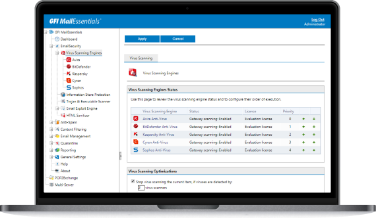
GFI MailSecurity uses multiple virus scanners to scan inbound email. Using multiple scanners drastically reduces the average time to obtain virus signatures which combat the latest threats, and therefore greatly reduces the chances of an infection. The reason for this is that a single anti-virus company can never ALWAYS be the quickest to respond. For each outbreak, virus companies have varying response times to a virus, depending on where the virus was discovered, etc. By using multiple virus engines, you have a much better chance of having at least one of your virus engines up-to-date and able to protect against the latest virus. In addition, since each engine has its own heuristics and methods, one virus engine is likely to be better at detecting a particular virus and its variants, while another virus engine would be stronger at detecting a different virus. Overall, more virus engines means better protection. View screenshot.

Scan against trojans and executables

The GFI MailSecurity Trojan & Executable Scanner detects unknown malicious executables (for example, trojans) by analyzing what an executable does. Trojans are dangerous as they can enter a victim’s computer undetected, granting an attacker unrestricted access to the data stored on that computer. Anti-virus software will NOT catch unknown trojans because it is signature-based. The Trojan & Executable Scanner takes a different approach by using built-in intelligence to rate an executable's risk level. It does this by disassembling the executable, detecting in real time what it might do, and comparing its actions to a database of malicious actions. The scanner then quarantines any executables that perform suspicious activities, such as accessing a modem, making network connections or accessing the address book. View screenshot.

Norman Virus Control & BitDefender virus engines are included

GFI MailSecurity is bundled with Norman Virus Control and BitDefender. Norman Virus Control is an industrial strength virus engine that has received the 100% Virus Bulletin award 32 times running. It also has ICSA and Checkmark certification. BitDefender is a very fast and flexible virus engine that excels in the number of formats it can recognize and scan. BitDefender is ICSA certified and has won the 100% Virus Bulletin award and the European Information Technologies Prize 2002. GFI MailSecurity automatically checks and updates the Norman Virus Control and BitDefender definition files as they become available. The GFI MailSecurity price includes updates for one year. View screenshot.

Kaspersky, McAfee and AVG virus engines (optional)

To achieve even greater security, users can add the Kaspersky, McAfee and/or AVG anti-virus engines as a third, fourth or fifth anti-virus engine or as a replacement to one of the other engines. Kaspersky Anti-Virus is ICSA-certified and is well known for the unsurpassed depth of its object scanning, the high rate at which new virus signatures are released and its unique heuristic technology that effectively neutralizes unknown viruses. The McAfee virus engine is particularly strong at detecting non-virus attacks such as rogue ActiveX controls. With 15 years of experience in the anti-virus industry, GRISOFT employs some of world's leading experts in anti-virus software, specifically in the areas of virus analysis and detection. Click here for pricing!

Automatic removal of HTML scripts

The advent of HTML email has made it possible for hackers/virus writers to trigger commands by embedding them in HTML email. GFI MailSecurity checks for script code in the email message body and disables these commands before sending the "cleaned" HTML email to the recipient. GFI MailSecurity is the only product to protect you from potentially malicious HTML email using a GFI patented process, safeguarding you from HTML viruses and attacks launched via HTML email.

Email exploit detection engine

GFI's Email Exploit Engine builds on GFI's leading research on email exploits, and safeguards you from future email viruses and attacks that use known application or operating system exploits. For example, GFI MailSecurity would have protected you against the Nimda and Klez viruses when they first emerged without needing any updates, because these viruses use known exploits. GFI SecurityLabs regularly finds new email exploits, and these are automatically downloaded by GFI MailSecurity. GFI MailSecurity is the only email security product to detect email exploits. View screenshot.

Spyware detection

GFI MailSecurity's Trojan & Executable Scanner can recognize malicious files including spyware and adware. GFI MailSecurity can also detect spyware transmitted by email via the Kaspersky virus engine (optional) which incorporates a dedicated spyware and adware definition file that has an extensive database of known spyware, trojans and adware.

Attachment checking

GFI MailSecurity's attachment checking rules enable administrators to quarantine attachments based on user and file type. For example, all executable attachments can be quarantined for administrator review before they are distributed to the user. GFI MailSecurity can also scan for information leaks, for example, an employee emailing a database. You can also choose to delete attachments like .mp3 or .mpg files. View screenshot.

Multiply the value of GFI MailSecurity with powerful reporting

The GFI MailSecurity ReportPack is a full-fledged reporting companion to GFI MailSecurity. From trend reports for management (ROI) to daily drill-down reports for technical staff; the GFI MailSecurity ReportPack provides you with the easy-to-view information you need to fully understand your email security patterns. Full automation and custom scheduling allow you true install-and-forget functionality! The GFI MailSecurity ReportPack offers several default and customizable reports that can be prepared on an hourly, daily, weekly or monthly basis including:

  • Viruses blocked
  • Inbound email traffic
  • Outbound email traffic
  • Total inbound and outbound email traffic
  • Processed emails
  • Blocked emails
  • And more!
More information about the GFI MailSecurity ReportPack!

Granular user-based email content policies/filtering

Using GFI MailSecurity's powerful content policies rules engine, you can configure rule sets based on user and keywords that allow you to quarantine potentially dangerous content for administrator approval. In this way, GFI MailSecurity can also scan for offensive content.

Custom quarantine filters

GFI MailSecurity enables you to configure a series of search folders (similar to MS Outlook Search Folders) within the ‘Quarantine Store’, permitting you to manage quarantined emails better and faster. For example, you can set up a folder for emails that were quarantined by virus checking and another for emails quarantined by attachment checking for a particular user, allowing you to prioritize which folders you check first: It may be more important to examine the attachment checking folder first as it is more likely to contain emails that need to be approved and forwarded to users. View screenshot.

Enable easy quarantine folder monitoring through RSS feeds

GFI MailSecurity takes advantage of the power of RSS (Really Simple Syndication) feeds to simplify your work as an administrator in keeping an eye on your email quarantine store. Through RSS feeds, you will be informed of all new quarantined objects, avoiding the need to log onto the quarantine store to check for new updates manually.

Web-based configuration – enables remote management from any location

The product’s web-based configuration allows you to configure and monitor the product and manage quarantined emails remotely from any computer that is equipped with a browser. This means that you can monitor and manage GFI MailSecurity from anywhere in the world.

Approve/reject quarantined email using the moderator client, email client or web-based moderator

GFI MailSecurity provides several options for moderating quarantined email. The moderator client gives you a familiar Windows interface for approving/rejecting email. The web-based moderator allows you to approve/reject emails from anywhere on your network. Alternatively, GFI MailSecurity can also forward quarantined emails to an email address, enabling you to use a public folder to distribute the quarantined items to multiple administrators. View screenshot.

Searching within quarantined emails

It is possible to conduct searches within all emails that GFI MailSecurity quarantines. Such searches can be performed among inbound or outbound emails to or from a particular user, for instance. Searches can also be carried out based on sender, recipient and also quarantine reason, freeing the administrator from the need to go through all quarantined emails one by one. View screenshot.

Full threat reporting for quarantined emails

When an email is quarantined, GFI MailSecurity gives a full threat report, detailing all threats identified per email.

Server-based anti-spam

GFI MailSecurity's companion product, GFI MailEssentials for Exchange/SMTP offers spam protection at server level and eliminates the need to install and update anti-spam software on each desktop. GFI MailEssentials includes a number of effective methods to virtually eliminate spam from your network. It also provides disclaimers, Internet email reporting, server-based auto replies and POP3 downloading. GFI MailEssentials integrates seamlessly with GFI MailSecurity and both are available as a suite. Click here for more information about GFI MailEssentials!

Checkmark & ICSA certified

GFI MailSecurity holds Checkmark certification from West Coast Labs and ICSA certification from TruSecure.

Other features:

  • Automatic quarantining of Microsoft Office documents with macros
  • Detects attachment extension hiding & renaming
  • User-based, flexible rules configuration
  • Scans embedded emails
  • Lexical analysis.

You're in good company...

Many leading companies have chosen GFI MailSecurity for Exchange/SMTP. Here are just a few: NASA, European Central Bank, MG Rover Group, Caterpillar, PerotSystems, Port Of Tilbury London Ltd, Mexx International BV (Netherlands) and many more. Customer list and customer testimonials.

For more info on why you need GFI MailSecurity, please click here!

System requirements

Windows 2000 Server/Advanced Server (Service Pack 1 or higher) or Windows 2003 Server/Advanced Server, Windows XP or Windows Server 2008 running IIS 7
Microsoft Exchange server 2000 (SP1), 2003, 2007, 4, 5 or 5.5, Lotus Domino, or any SMTP/POP3 mail server
When using Small Business Server, ensure you have installed SP 2 for Exchange Server 2000 and SP1 for Exchange Server 2003
Microsoft .NET Framework 1.1/2.0
MSMQ – Microsoft Messaging Queuing Service
Internet Information Services (IIS) – SMTP service & World Wide Web service
Microsoft Data Access Components (MDAC) 2.8.
 

For more detailed system requirements, please see the installation chapter.


 Quick Links
>   View screenshots
>   What is the difference between GFI MailSecurity and anti-virus only products?
>   Why do I need a Trojan Scanner?
>   Is spyware detected too?
>   Should I install GFI MailSecurity in VS API or Gateway mode?
>   GFI MailSecurity features table
>   GFI MailEssentials & GFI MailSecurity Suite
>   BitDefender virus engine: Facts & figures
>   Kaspersky Labs virus engine: Facts & figures
>   What's new in GFI MailSecurity for Exchange/SMTP 10?
>   Upgrading from GFI MailSecurity 8, 9 to GFI MailSecurity 10
>   View installation instructions & system requirements
>   More frequently asked questions


 Screenshots

GFI MailSecurity

GFI MailSecurity configuration

GFI MailSecurity configuration


Configure attachment checking

Configure attachment checking


Configure what to do with mails that contain certain content

Configure what to do with mails that contain certain content


Creating Quarantine Search Folders

Creating Quarantine Search Folders


Exploit engine quarantines emails with OS application exploits

Exploit engine quarantines emails with OS application exploits


GFI MailSecurity supports multiple virus engines

GFI MailSecurity supports multiple virus engines


Quarantine Store

Quarantine Store


Realtime Monitor

Realtime Monitor


The McAfee anti-virus engine

The McAfee anti-virus engine


Trojan & Executable Scanner configuration

Trojan & Executable Scanner configuration


 Screenshots

GFI MailSecurity ReportPack

User interface

User interface


Executive reports

Executive reports


Administrative reports

Administrative reports


   © 2008. All rights reserved. GFI Software Home Products Download trials Support Ordering Site map About us Contact us
GFI solutions: Exchange anti spam filter - exchange anti virus - isa server - network vulnerability scanner - event log management - USB security software - exchange archiving - fax server software